RC

Image to model

Build better 3D results with realitycapture photogrammetry

Realitycapture photogrammetry turns overlapping photographs into measured 3D data. This guide explains the capture logic, processing stages, useful outputs, and trade-offs before you begin.

Free to start · no signup

Explore the workflow

Choose the right capture path

Photogrammetry works best when the scene, camera coverage, and desired output are planned together. These related guides help you choose a practical starting point.

Mechanism checks

Where the workflow needs help

Photogrammetry is powerful, but it does not recover information that the camera never captured. Plan around these edges instead of treating every image set as equally usable.

Reflective or transparent surfaces

Glass, polished metal, and clear plastic may not provide stable visual features for matching between photographs.

Workaround

Use temporary matte treatment where appropriate, change the lighting, or capture a separate reference geometry pass.
Hidden and occluded areas

A reconstruction cannot reliably model the back, underside, or interior of an object when those areas are absent from the images.

Workaround

Add camera positions that expose concealed surfaces and keep coverage consistent around the subject.

Weak visual texture

Plain walls, smooth painted surfaces, and repetitive patterns can give the alignment process too few unique points to track.

Workaround

Improve image overlap, add non-permanent visual references, or combine the capture with measured control points.

Scale without a reference

Photographs can produce a convincing shape while leaving real-world scale ambiguous unless a known measurement is included.

Workaround

Add a scale bar, surveyed markers, or another dimension that can be applied during inspection and export.

Core sequence

How the reconstruction workflow works

A dependable result comes from treating capture, alignment, and model generation as connected stages rather than one automatic button.

  1. 1

    Capture overlapping views

    Photograph the subject from a steady path with consistent exposure and enough overlap for neighboring images to share recognizable features.

  2. 2

    Align and inspect imagery

    The software compares shared features, estimates camera positions, and builds a sparse representation. Remove blurry or poorly connected images before continuing.

  3. 3

    Build and validate the model

    Generate denser geometry, apply texture when useful, then inspect holes, scale, edges, and unwanted background before exporting.

Visible transformation

From photographs to a usable mesh

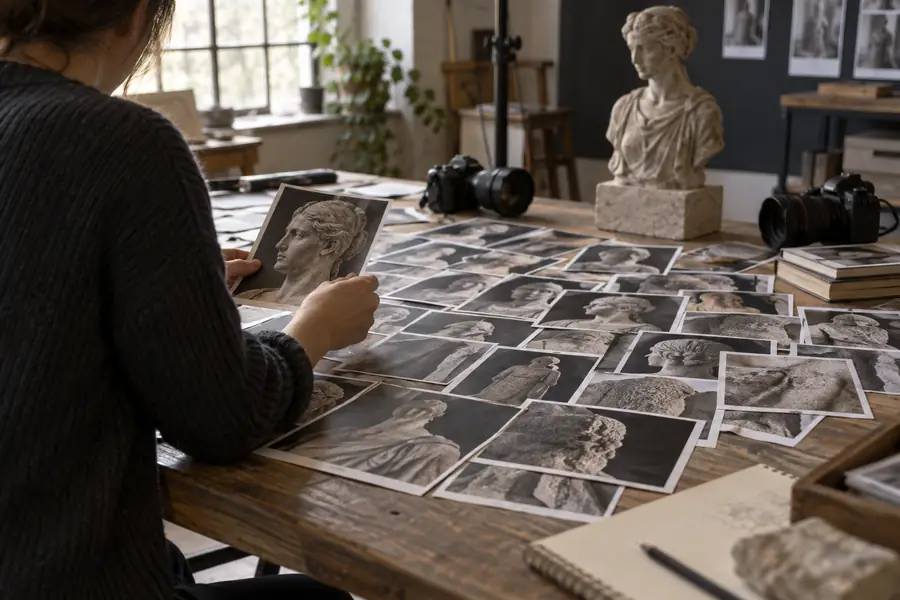
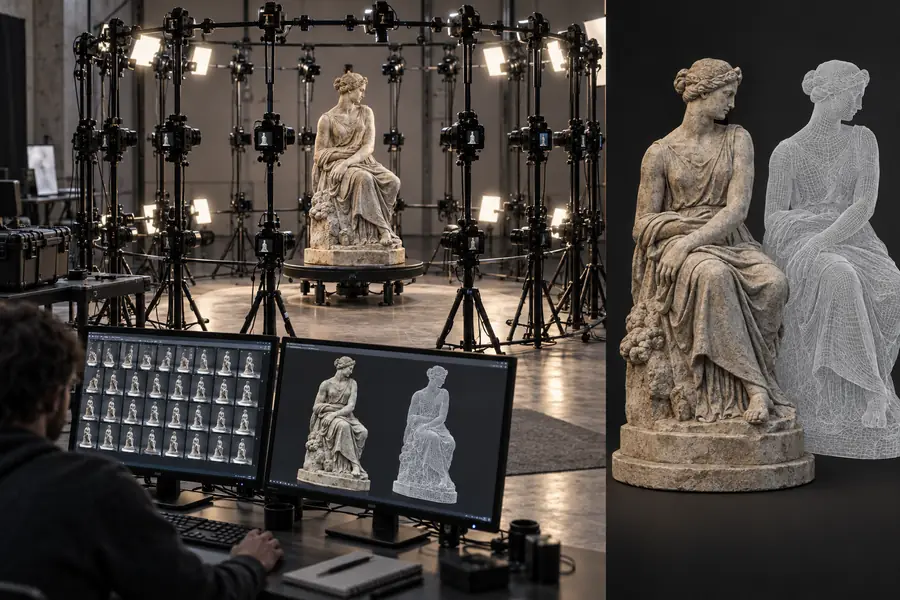
The visual change is not magic: image overlap supplies evidence, alignment establishes camera relationships, and reconstruction turns that evidence into geometry.

Overlapping photographs prepared for a reconstruction Photo set
Textured 3D mesh created from the photograph set Reconstructed mesh
A clean output depends on coverage, focus, lighting, and scale references—not only on the processing step.

Capability split

Photogrammetry workflow at a glance

The same project can be judged by what the image set provides and by what a manual modeling workflow can control. This comparison clarifies where image-based reconstruction is strongest.

Image-based reconstruction
Manual 3D modeling

Starting material

Image-based reconstruction

Overlapping photographs of the real subject

Manual 3D modeling

Reference drawings, measurements, or concept guidance

Best fit

Image-based reconstruction

Existing objects, spaces, terrain, and visible surfaces

Manual 3D modeling

Designed assets, clean forms, and controlled proportions

Surface detail

Image-based reconstruction

Can preserve captured texture and wear

Manual 3D modeling

Must be modeled or painted deliberately

Hidden geometry

Image-based reconstruction

Limited by what the cameras can see

Manual 3D modeling

Can be created even without photographic coverage

Scale control

Image-based reconstruction

Needs a known reference or measured control

Manual 3D modeling

Can be set directly during modeling

Repeatability

Image-based reconstruction

Depends on consistent capture conditions

Manual 3D modeling

Depends on a repeatable modeling specification

Production speed

Image-based reconstruction

Efficient when coverage is clear and the subject already exists

Manual 3D modeling

Efficient for simple, designed, or highly edited forms

Practical applications

Who benefits from this workflow

Different teams value different parts of the reconstruction process. The right use case is one where photographic evidence is more useful than starting from an empty scene.

Object archivists

A museum team needs a digital record of a sculpture with visible wear and irregular surface detail.

The image set preserves appearance for inspection, documentation, and later presentation.

reality capture free

Survey and mapping teams

A drone operator captures overlapping views of a site, stockpile, or structure from planned flight lines.

The resulting spatial data gives the team a visual base for review, measurement, and communication.

reality capture drone mapping

3D artists

An artist needs real-world rocks, buildings, or surface materials as a starting point for a scene.

Captured geometry and texture reduce manual reference gathering before cleanup and creative editing.

realitycapture tutorial

Technical reviewers

A project lead must decide whether image-based reconstruction or manual modeling better fits the asset.

The comparison makes coverage, scale, hidden geometry, and editing requirements explicit.

meshroom vs reality capture

Pipeline checkpoints

What the pipeline produces

These checkpoints describe the main evidence chain from capture to inspected asset. They are useful for planning reviews and finding problems before export.

Overlapping photographs provide the visual evidence
01 capture
Shared features establish camera relationships
02 alignment
Dense geometry turns evidence into a 3D surface
03 model
Scale, holes, texture, and edges are checked before delivery
04 review

Common questions

Questions about photogrammetry

A few practical questions come up before the first image set is processed.

It is an image-based method for reconstructing 3D geometry from overlapping photographs. The software identifies shared visual features, estimates camera positions, and uses that evidence to build a point cloud, mesh, or textured model.

There is no single number that works for every subject. The useful goal is consistent overlap from enough viewpoints to cover every visible surface, with extra images added around edges, complex shapes, and areas that are easy to hide.

It can create a detailed and useful model when the images are sharp, well covered, and supported by a known scale reference. Accuracy falls when surfaces are reflective, transparent, textureless, moving, or missing from the camera views.

Use stable focus, even exposure, clear visual features, and a steady path around the subject. Avoid motion between shots, large gaps in coverage, and major lighting changes that make the same feature look unrelated across images.

No. The process can only infer geometry from available evidence, so an unseen underside or interior may be missing or unreliable. Capture additional angles or combine the result with manual modeling when hidden areas matter.

Start creating
Start creating